Rated excellent on Google
Free shipping over €70
Over 7,500 satisfied customers





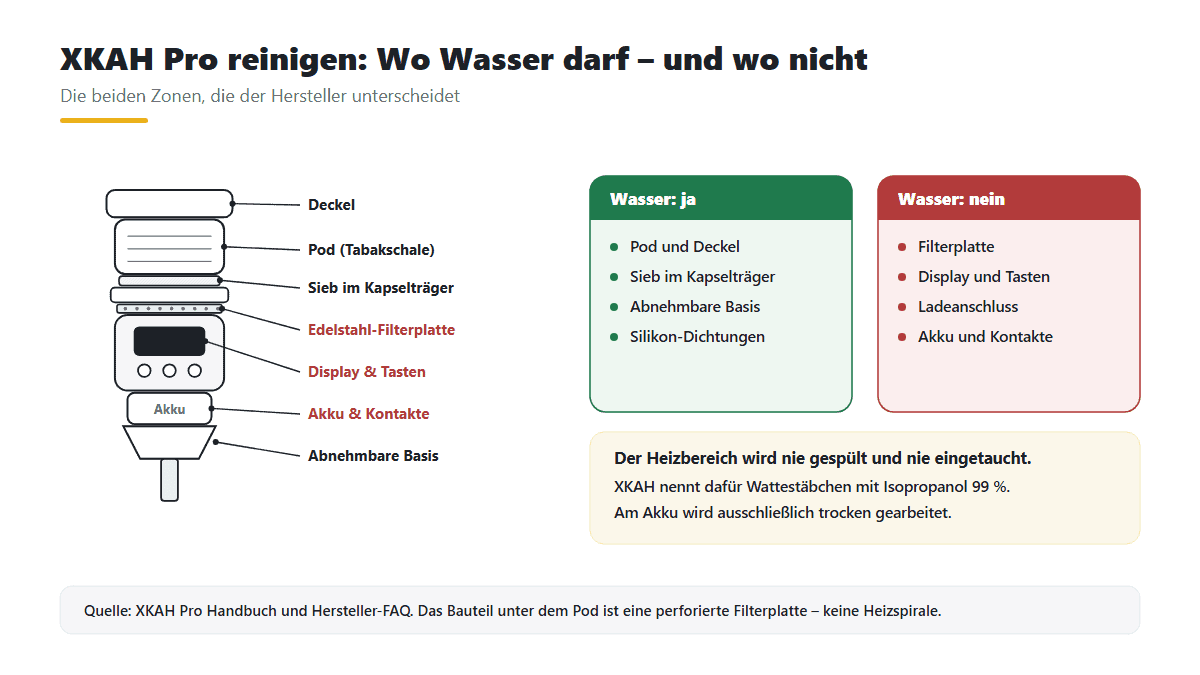
Short and honest: Pod, Sieb, Deckel und die abnehmbare Basis gehören nach jeder Session unter warmes Wasser und danach vollständig trocken. Der Heizbereich dagegen wird nie abgespült und nie eingetaucht – er wird trocken mit einem Wattestäbchen und Isopropanol 99 % gereinigt, und am Akku wird ausschließlich trocken gearbeitet. Schaffst du die Reinigung nicht nach jeder Session, nennt XKAH mindestens alle ein bis zwei Wochen als Untergrenze. Das ist die Notlösung, nicht das Ziel.
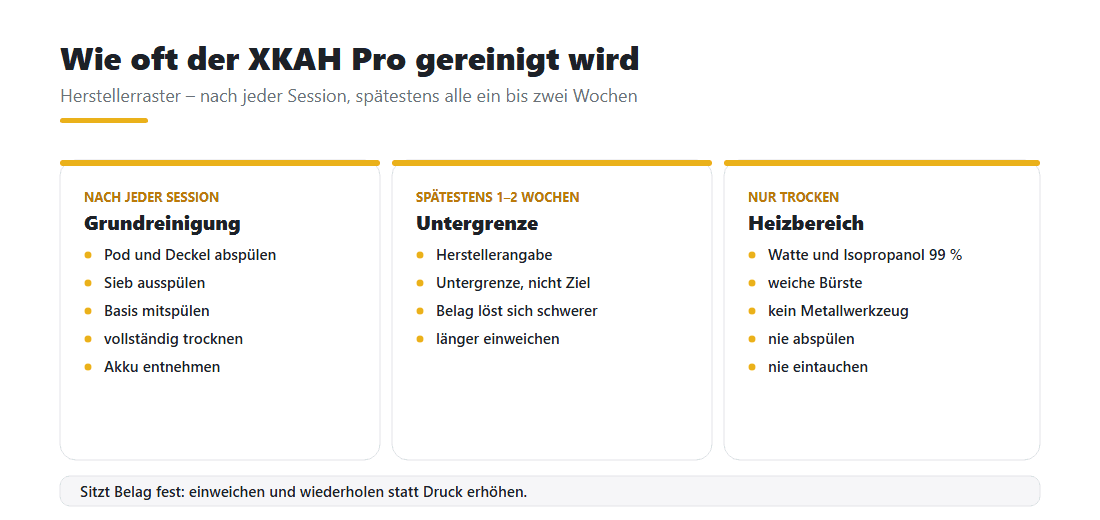
Die kurze Antwort lautet: nach jeder Session. Das klingt nach viel, dauert aber keine fünf Minuten, weil der größte Teil schlicht Abspülen ist. Der Grund dafür ist einfache Physik. Molasse ist Zucker und Glycerin. Solange sie feucht ist, löst sie sich in warmem Wasser fast von allein. Trocknet sie aus und wird beim nächsten Aufheizen erneut erhitzt, brennt sie schichtweise ein – und dann hilft nur noch Einweichen und Geduld.
XKAH nennt als Untergrenze mindestens alle ein bis zwei Wochen. Diese Zahl ist für den Fall gedacht, dass es im Alltag nicht anders geht. Sie ist ausdrücklich kein empfohlener Rhythmus, sondern der Punkt, ab dem es anfängt, Schaden anzurichten.
Wer viel raucht, merkt den Unterschied zuerst am Geschmack. Wer das Gerät nur am Wochenende nutzt, merkt ihn zuerst am Widerstand beim Ziehen. Beides sind Anzeichen für dieselbe Ursache.
Die Liste ist kurz: warmes Wasser, eine weiche Bürste, Wattestäbchen und Isopropanol 99 %. Mehr nennt der Hersteller nicht, und mehr braucht es auch nicht. Die Zange aus dem Lieferumfang ist übrigens kein Reinigungswerkzeug, sondern dafür da, den heißen Pod zu greifen.
Wichtiger ist, was not dazugehört. Keine Stahlwolle, keine Topfkratzer, kein metallenes Werkzeug am Heizbereich. XKAH nennt für genau diese Stellen eine weiche Bürste. Metallische Hilfsmittel können die Oberfläche zerkratzen, und Kratzer geben Belag beim nächsten Mal mehr Halt, nicht weniger. Für die Spülmaschine gilt nach unserer Angabe: Spülmaschinenfest sind nur das Unterteil des XKAH und die Ersatz-Pods, nicht das Oberteil mit der Elektronik. Das Handbuch selbst nennt ausschließlich das Abspülen unter fließendem Wasser.
Welches Teil was verträgt, steht hier auf einen Blick:
| Bauteil | Womit | Wasser | Wie oft |
|---|---|---|---|
| Pod und Deckel | warmes Wasser, bei Bedarf weiche Bürste | ja, gründlich abspülen | nach jeder Session |
| Sieve | warmes Wasser, weiche Bürste | Yes | nach jeder Session |
| Kapselträger | warmes Wasser | Yes | nach jeder Session |
| Abnehmbare Basis | warmes Wasser | Yes | nach jeder Session |
| Silikon-Dichtungen S und L | warmes Wasser, abziehen und einzeln spülen | Yes | bei Bedarf |
| Perforierte Filterplatte | Wattestäbchen mit Isopropanol 99 % | no – nie abspülen, nie eintauchen | nach jeder Session |
| Display, Tasten, Ladeanschluss | trockenes oder leicht feuchtes Tuch | no | bei Bedarf |
| Akku und Kontakte | ausschließlich trocken, Wattestäbchen | no | bei Startproblemen |
Der Ablauf ist immer derselbe. Er dauert nach etwas Übung rund fünf Minuten, und das meiste davon ist Wartezeit beim Abkühlen.


Ja. Die Basis ist das Teil, das auf der Rauchsäule sitzt, und sie gehört zur wasserfesten Seite. Sie wird bei der Grundreinigung gern übersehen, obwohl sich genau dort Kondensat sammelt. Die Silikon-Dichtungen in den Größen S und L lassen sich abziehen und einzeln spülen.
Was nicht ins Wasser darf, ist der Gerätekörper mit Display, Tasten, Ladeanschluss und Akkuschacht. Hier genügt ein trockenes oder leicht feuchtes Tuch. Die Grenze verläuft also nicht zwischen „oben“ und „unten“, sondern zwischen dem, was Elektrik enthält, und dem, was keine enthält.
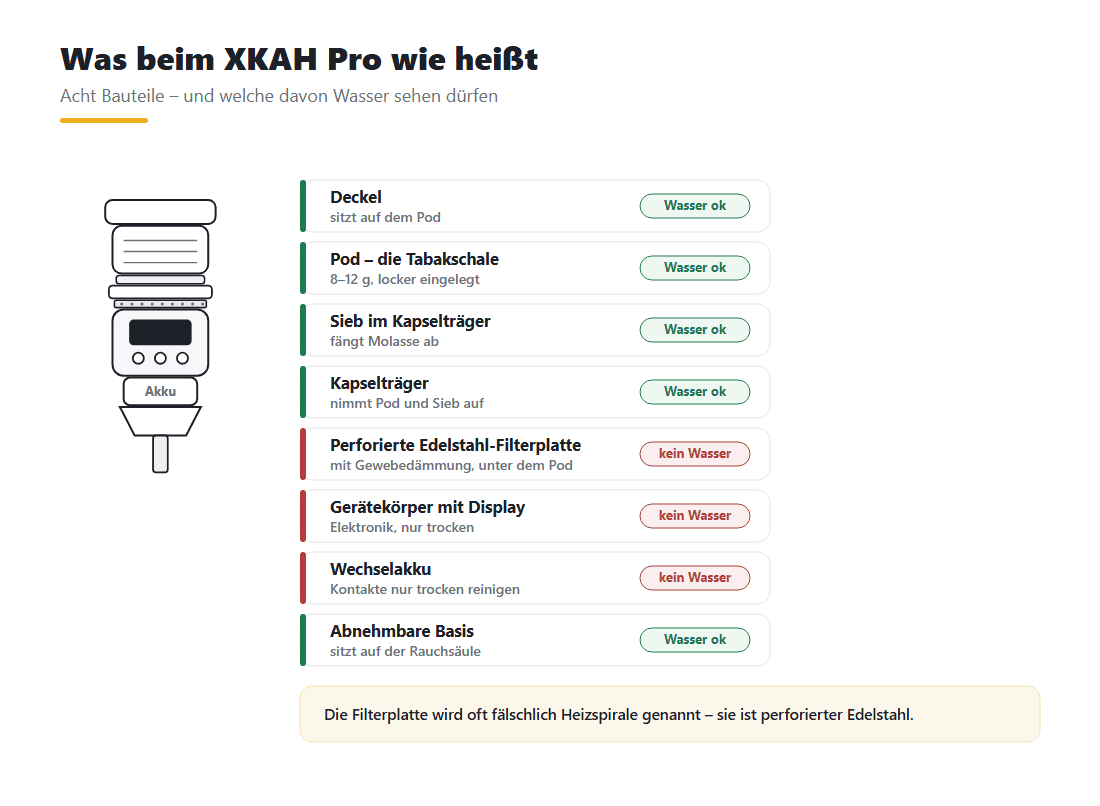
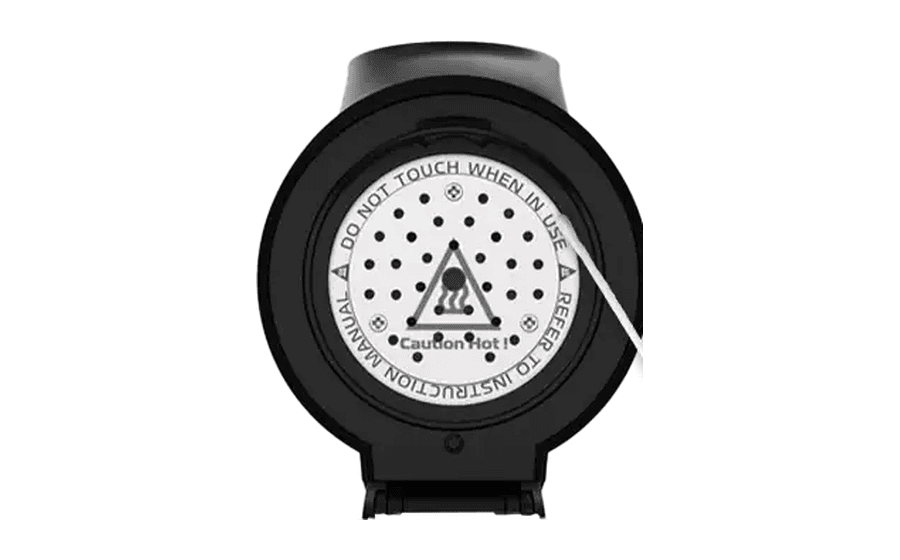
Weil dort die Elektrik sitzt – und weil das Bauteil nicht das ist, wofür es oft gehalten wird. Als wir einen XKAH Pro zerlegt haben, kam keine freiliegende Heizspirale zum Vorschein, sondern eine perforierte Edelstahl-Filterplatte mit Gewebedämmung. Genau diese Platte lässt sich mit einem Wattestäbchen erreichen – und genau deshalb funktioniert dort trockene Reinigung, aber kein Wasserstrahl.
Die Hersteller-FAQ erlaubt für diesen Bereich ausdrücklich ein Wattestäbchen mit Isopropylalkohol oder Wasser. Untersagt ist das Abspülen und das Eintauchen. Der Unterschied ist wesentlich: Ein angefeuchtetes Wattestäbchen gibt kaum Flüssigkeit ab, ein Wasserstrahl treibt sie in jede Fuge.
Beim Akku gilt die strengere Regel. Dort wird ausschließlich trocken gearbeitet, auch an den Kontakten – ohne Isopropanol, ohne feuchtes Tuch.
An drei Stellen, die beim schnellen Abspülen regelmäßig durchrutschen.
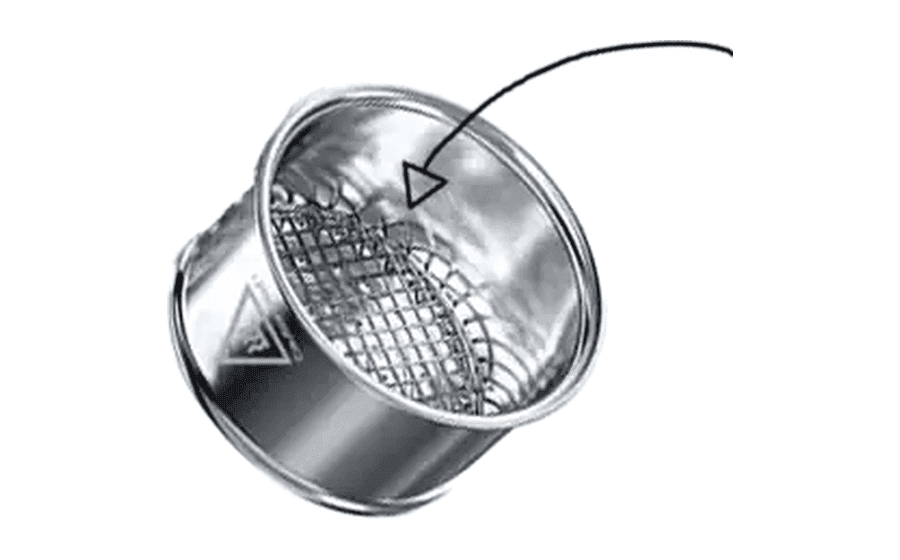
Das Sieb. Du siehst es, wenn du in den Pod schaust: Es hält den Tabak zurück und lässt Luft und Rauch durch – und ist deshalb die schmutzigste Stelle im ganzen Gerät. Von oben sieht es oft sauber aus, während die Maschen von unten zugesetzt sind. Deshalb gegen die Durchflussrichtung spülen.
Die Auflagefläche zwischen Kapselträger und Gerätekörper. Dort bildet sich ein dünner, klebriger Film, der beim nächsten Aufheizen aushärtet. Ein Wattestäbchen reicht, solange der Film frisch ist. Diese Fläche ist zugleich eine der beiden Kontaktstellen – sie taucht deshalb im nächsten Abschnitt noch einmal auf.
Die Dichtungen. Silikon zieht Gerüche und hält Molasse in den Rillen fest. Abziehen, spülen, trocknen – und dabei gleich prüfen, ob sie noch elastisch sind. Eine hart gewordene Dichtung dichtet nicht mehr, egal wie sauber sie ist.
Es geht selten schlagartig kaputt, es wird schleichend schlechter – in dieser Reihenfolge:
Der weitaus größte Teil der Störungen, die uns erreichen, ist kein Defekt, sondern Verschmutzung oder Feuchtigkeit an einer Kontaktfläche. Wichtig dabei: Es gibt zwei Kontaktstellen, nicht eine – unter dem Akku und zwischen Basis und Kapselträger. Wer nur eine davon reinigt, sucht den Fehler danach an der falschen Stelle.
| Symptom | Erster Schritt | Zweiter Schritt | Supportfall, wenn… |
|---|---|---|---|
| Gerät startet nach der Reinigung nicht | Akku entnehmen, seine Kontakte trocken abtupfen | zweite Kontaktstelle zwischen Basis und Kapselträger trocken reinigen, alles durchtrocknen lassen | beide Kontaktstellen sind sauber und trocken und es bleibt dunkel |
| Display bleibt dunkel, Gerät reagiert aber | Restfeuchte: zerlegt an einem trockenen Ort stehen lassen | Kontakte trocken nachreinigen, erst danach wieder zusammensetzen | nach vollständigem Durchtrocknen unverändert |
| Tasten reagieren verzögert oder gar nicht | Molassefilm an der Tastenkante mit einem leicht feuchten Tuch abnehmen | Kante trocken nachwischen, keine Flüssigkeit in die Fuge geben | die Kante ist sauber und die Eingabe bleibt aus |
| Zug ist schwer, Rauch bleibt dünn | Sieb gegen die Durchflussrichtung freispülen, also von außen nach innen | Dichtsitz prüfen (Zugtest weiter unten) – oft ist es Nebenluft, nicht Belag | Sieb ist frei, Gerät ist dicht und der Zug bleibt schwer |
| Molasse läuft nach unten durch | Füllmenge auf 8–12 g zurücknehmen, locker einlegen statt anpressen | Sieb und Auflagefläche zwischen Kapselträger und Gerätekörper reinigen | es läuft trotz korrekter Füllung und sauberem Sitz durch |
Ein dunkler Pod ist erst einmal kein Defekt. Edelstahl läuft unter Hitze an, das ist eine Verfärbung und kein Belag. Der verlässliche Test ist der Finger, nicht das Auge: Fühlt sich die Innenfläche nach dem Spülen glatt an, ist der Pod in Ordnung, egal wie er aussieht. Ertastest du eine raue oder klebrige Schicht, muss sie weg – durch Einweichen, nicht durch Schrubben.
Zum Ersetzen gibt es zwei klare Gründe: eine verformte Schale, die nicht mehr plan aufliegt, und ein Sieb, das sich auch nach mehrfachem Einweichen nicht mehr freibekommt. Beides lässt sich nicht wegreinigen. Ein zweiter Pod im Haus löst nebenbei ein Alltagsproblem: Du musst nach der Session nicht warten, bis der erste durchgetrocknet ist.
Mit einem Handgriff, der zehn Sekunden dauert. Setz das Gerät auf die Rauchsäule, halte den Schlauchanschluss zu und zieh an. Bleibt der Widerstand stehen, sitzt alles dicht. Strömt Luft nach, zieht das Gerät Nebenluft – fast immer, weil eine Dichtung verrutscht ist, die falsche Größe sitzt oder ein Teil nicht ganz eingerastet ist.
Der Test lohnt sich nach jeder Reinigung, weil genau dann Dichtungen neu sitzen. Nebenluft fällt sonst erst mitten in der Session auf, wenn der Rauch dünn bleibt – und dann wird meist an der Temperatur gedreht, obwohl das Problem mechanisch ist.
Der große Unterschied ist die Trennung in zwei Zonen. Bei einem Tonkopf kannst du alles unter Wasser halten. Hier gibt es eine wasserfeste Hälfte und eine elektrische, und dazwischen verläuft eine Linie, die man nicht überschreiten darf.
Der zweite Unterschied betrifft den Takt. Ein klassischer Kopf wird nach der Session ausgekippt und kann notfalls warten. Beim XKAH sitzt der Belag direkt an einem Bauteil, das beim nächsten Mal wieder heiß wird. Was du heute stehen lässt, brennst du morgen ein.
Und ein Punkt, den viele unterschätzen: Weniger Tabak heißt auch weniger Rückstand. XKAH nennt 8 bis 12 Gramm pro Füllung, locker eingelegt und nicht angedrückt. Ein überfüllter, fest gestopfter Pod läuft stärker aus und macht mehr Arbeit – bei schlechterem Ergebnis.
Pods und Dichtungen sind Verschleißteile. Ein zweiter Pod erspart das Warten aufs Durchtrocknen.
Nach jeder Session. XKAH nennt als Untergrenze mindestens alle ein bis zwei Wochen – das ist die Notlösung, nicht das Ziel. Je länger Molasse im Gerät bleibt, desto fester sitzt sie.
Die Ersatz-Pods ja: Nach unserer Angabe sind nur das Unterteil des XKAH und die Ersatz-Pods spülmaschinenfest, das Oberteil mit der Elektronik nicht. Das Handbuch selbst nennt nur das Abspülen unter fließendem warmem Wasser, bei Bedarf mit einer weichen Bürste.
An den Heizbereich darf ein Wattestäbchen – mit Isopropanol oder Wasser angefeuchtet. Was nicht geht: abspülen oder eintauchen. Am Akku und an den Kontakten wird ausschließlich trocken gearbeitet.
XKAH nennt 99 %. Niedrigere Konzentrationen enthalten mehr Wasser und trocknen langsamer ab. Sparsam auf ein Wattestäbchen geben und Display, Tasten, Ladeanschluss und Akkuschacht aussparen.
Nicht zwangsläufig. Edelstahl läuft unter Hitze an, das ist eine Verfärbung und kein Defekt. Entscheidend ist, ob sich Belag ertasten lässt. Fühlt sich die Oberfläche glatt an, ist alles in Ordnung.
Davon raten wir ab. XKAH nennt für diese Stellen ausdrücklich eine weiche Bürste. Metallische Hilfsmittel können die Oberfläche zerkratzen und sind nicht freigegeben. Besser: einweichen und wiederholen.
Fast immer ist Restfeuchte oder ein Molassefilm an einer Kontaktfläche die Ursache. Davon gibt es zwei: unter dem Akku und zwischen Basis und Kapselträger. Beide nur trocken reinigen und dem Gerät Zeit zum vollständigen Durchtrocknen geben.
So lange, bis Pod und Heizbereich sicher anzufassen sind. Das Gerät trägt eine eigene „Caution Hot“-Warnung, und die Zange liegt nicht ohne Grund bei. Erst danach zerlegen.
Stand: September 2026. Angaben ohne Herstellerbeleg haben wir bewusst weggelassen – zu diesem Gerät kursieren mehrere Werte, die sich beim Nachprüfen nicht bestätigen ließen.