Rated excellent on Google
Free shipping in Germany over €70
Over 7,500 satisfied customers





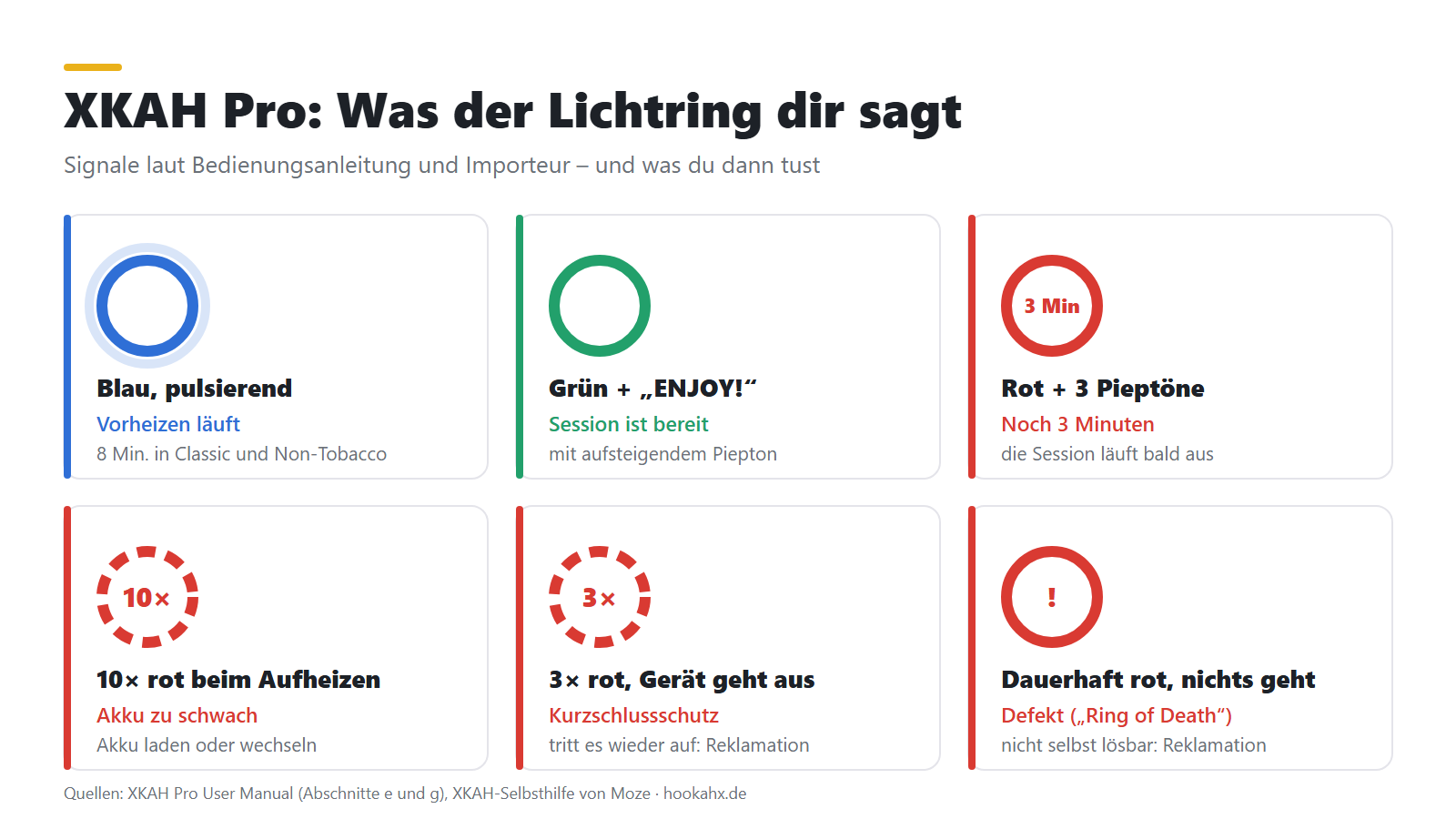
In brief: The light ring of the XKAH Pro always shows you what the device is doing: Blue means preheating, Green means ready, Red with three beeps means three minutes left. If the light ring flashes red 10 times while heating up, the battery needs charging. For dense smoke, fill the pod loosely and place the XKAH airtight on the hookah. Our customer service is there for you with any questions about warranty and service, and we take care of the process.
The light ring shows you what state your XKAH Pro is in. Here's how to read the signals:
| Signal | What it means | What you do |
|---|---|---|
| Light ring blue, pulsing | The device is preheating. In the Classic and Non-Tobacco modes this takes 8 minutes. | Wait until the light ring turns green. |
| Light ring green, rising beep, “ENJOY!” | The session is ready. | Get started. |
| Light ring red, three beeps during the session | 3 minutes of session time remain. | Finish the bowl or start a new session. |
| Light ring flashes red 10 times while heating up | The battery is too weak; the device doesn't heat. | Charge the battery or swap it for a full one. |
| Battery indicator on the display flashes | The charge level is below 10 %. | Charge the battery. |
| Red light flashes 3 times, the device switches off | The short-circuit protection has been triggered. | If this happens repeatedly: stop using the device and contact our customer service. |
| Light ring stays solid red, the device doesn't respond | The device needs servicing. | Contact our customer service. |
Here's how to start your XKAH Pro step by step:
After cleaning, all contact surfaces must be completely dry. Where the second contact point is located is shown in our guide Clean XKAH.
For a dense, flavorful session, these points matter:
If the flavor is too strong or too harsh for you, three adjustments help:
Which settings make sense in general is explained in our guide to the electric shisha head. If the flavor is still harsh, get in touch with our customer service.
You get the full battery runtime with good battery care: charge fully before every session, never let the battery run down to zero and don't store it empty for long. Deep discharge permanently reduces capacity.
The XKAH Lite runs on a power adapter instead of a battery and therefore shows its own signals. The difference between the two devices is explained in our XKAH Lite vs. Pro comparison.
| What you see | What you do |
|---|---|
| Switching on the Lite | The Lite starts as soon as it has power. Otherwise, press the middle button five times in a row. The contact points on the body and head must be clean and dry. |
| The power adapter makes noises | Stop using the power adapter and contact our customer service. |
| The light ring lights up red 3 times when you start the preheat | Start the preheat again. On the second attempt it usually runs through normally. |
| The light ring lights up red 6 times when you start a mode | The head or heating plate isn't seated properly on the body. Check the contact points and put the head back on. |
| The Lite restarts in the middle of the preheat | Check that the head sits fully and flat on the device. |
| The Lite switches off during preheat | Check that the cable is seated properly. If it doesn't start again afterwards, contact our customer service. |
| The dial turns, but nothing changes | The lock is active. Press the middle button twice and then hold it down until the Lite beeps. |
| It smokes slightly after starting | Molasses under the heating plate is burning off. Clean the gap with a flattened cotton swab and also do a dry run without a pod at the highest setting. |
If you have a question about your XKAH, contact our customer service. We take care of the process for you. Coming straight to us is especially worthwhile if:
To speed things up, send us these details:
We'll get back to you and take care of everything else until your XKAH is running again.
If you'd like to return a new device, our Cancellation policy. It also states what applies to sealed devices if the seal has been opened. It's best to read it before you open the packaging, and write to us beforehand if you're unsure. How a return works is described on the page Warranty Claims and Returns.
A second battery bridges the charging time, fresh pods keep the flavor clean.
Pulsing blue means preheating, green with “ENJOY!” means ready. Red with three beeps during the session means: 3 minutes left. If the light ring flashes red 10 times while heating up, the battery is too low. If the red light flashes 3 times and the device switches off, the short-circuit protection has been triggered. If the light ring stays solid red and the device doesn't respond, contact our customer service.
Press the main button five times within 1.5 seconds. The battery is seated correctly when the back with the charging port faces the back of the device. Keep the contact points on the underside of the battery clean with a dry cotton swab.
A full charge takes about 90 to 100 minutes. The box contains a USB-C cable, no power adapter. Via USB-C, the battery accepts 5 V/3 A, 9 V/3 A, 12 V/2.25 A, 15 V/2 A or 20 V/1.5 A. The highest level equals 30 watts.
Wait until the light ring turns green after preheating, fill the pod loosely and place the XKAH airtight on the hookah. Also check that the device shows Celsius: 262 °F is only about 128 °C.
Fill less and more loosely, lower the temperature in small steps in Custom mode and keep the pod and device clean.
The head or heating plate isn't seated properly on the body. Check the contact points for molasses or liquid and put the head back on.
Contact our customer service by email or WhatsApp, and we'll take care of the process for you. Have your order number, photos or a short video and the batch or serial number ready.
No. The device contains no parts that you can service yourself. Opening it risks electric shock, burns or fire. Repairs are handled by our service.
Sales are made exclusively to persons aged 18 and over.